It is a method that allows you to make sure that everything on the image is in focus. It is very useful when you are taking photographs with a very wide angle lens.
Shooting Process
There are several rules that you should follow and know while taking photos so that you can easily focus stack when post processing
Exposure
Use manual exposure to make sure all photos are exposed exactly the same way. Use small aperture between f11 and f16 to make sure that the Depth of field is large.
Focus
Focus on point closest to the camera and move the focus further and further. The amount of images you have to take depend on how close your foreground is. When you shoot your photograph with a wide angle lens and the foreground is about 25cm from the lens, you have to take about 5-6 pictures. If your foreground is 1m to 1.5m from the lens, you can take 2-3 images
Tip
When you take a set of photographs with the same settings and the same frame, sometimes it might be hard to distinguish which photograph is the first one and which one is the last one. You can help yourself by using a hand between the sets so that when you upload your images to your post processing software, you know when the new set starts and the old one ends.
Post Processing
Post processing is relatively easy thanks to modern editing software and its recognition capabilities. During this process, you can use Lightroom and Photoshop.
- Select first file and edit it to your liking
- Select the file that you’ve edited, hold down
Shiftkey and click on the last file from the set, to select all images in between - Press
Syncbutton to synchronise all images and apply the same settings - Open all these images in Photoshop
Right Click > Edit in > Open as layers in Photoshop - Fix focus breathing
- Make a copy of all layers in case Photoshop messes it up
- Select one copy of the set and go to
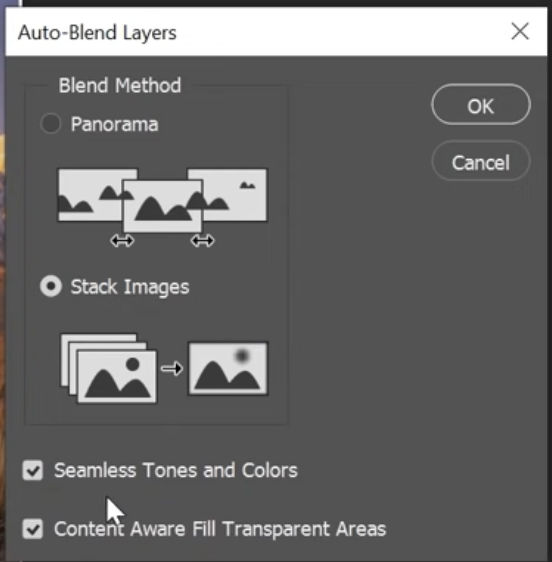
Edit > Auto Blend Layerssetting. - Select
Focus Stackoption and select all checkboxes below it.