To be able to use AWS as a Remote Backend, you have to use S3 and DynamoDB. S3 is being used for storing the state file and DynamoDB is used for locking and not allowing someone to run terraform apply, and overriding the state file at the same time.
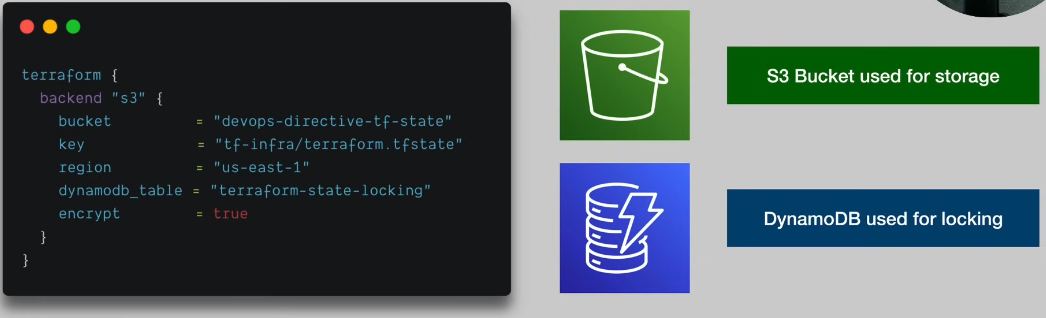
Before you provision any resources, you have to deploy your remote backend.
How to deploy a remote backend
To deploy backend, you have to first create a terraform module with this configuration, then run terraform apply and that should be it.
terraform {
  required_providers {
    aws = {
      source  = "hashicorp/aws"
      version = "~> 3.0"
    }
  }
}

provider "aws" {
  region = "us-east-1"
}

resource "aws_s3_bucket" "terraform_state_bucket" {
  bucket        = "herrschade-terraform-tf-state"
  force_destroy = true
}

resource "aws_s3_bucket_versioning" "versioning" {
  bucket = aws_s3_bucket.terraform_state_bucket.id
  versioning_configuration {
    status = "Enabled"
  }
}

resource "aws_s3_bucket_server_side_encryption_configuration" "name" {
  bucket = aws_s3_bucket.terraform_state_bucket.id

  rule {
    apply_server_side_encryption_by_default {
      sse_algorithm = "AES256"
    }
  }
}

resource "aws_dynamodb_table" "terraform_locks" {
  name         = "terraform-state-locking"
  billing_mode = "PAY_PER_REQUEST"
  hash_key     = "LockID"
  attribute {
    name = "LockID"
    type = "S"
  }
}
How to use Remote Backend
To be able to use it, in your main.tf file, you have to add the following code to specify it.
terraform {
  backend "s3" {
    bucket         = "herrschade-terraform-tf-state"
    key            = "terraform-aws-react/terraform.tfstate"
    region         = "us-east-1"
    dynamodb_table = "terraform-state-locking"
    encrypt        = true
  }
}