https://github.com/stevekinney/aws-v2/blob/main/content/14%20-%20Build%20Pipeline.md
What this course covers
This course covers everything I need to be able to release an application with AWS, Cloudfront etc.
What will I do during this course:
- Host on AWS
- Distribute the app globally
- Secure with SSL
- Automatically deploy with CI/CD
- Dynamically respond to requests
Account Setup
The most important things that developer should do when you setup an AWS account is to create a user and setup some alerts when you go above certain cost.
Setting up alerts and budgets
To setup a budget, you have to go here
Securing your Account
It is important to secure your root account which should never be used as the account that you use to manage your resources. Because of that, you have to create a new user with a min amount of permissions.
S3
It is a Simple Storage Service that allows us to store various files on it and that includes JavaScript. You create buckets where you can store your files (objects), you can read from buckets and you can host web pages out of buckets.
- Infinitely scalable (can handle files up to 5 tb)
- Can have files as small as 0 bytes
- great availability (99,99%)
- great durability
Other Features
- Lifecycle management (?)
- Versioning
- Encryption
- Security
Cost
- Uploading to S3 is free
- storage is paid for
- Requests are chargeable
Route53
It is basically a DNS service.
How to setup S3 Bucket for the webapp
There are some things that need to be done to make sure that public bucket is safe.
First of all, a policy should be in place to only allow to read from the bucket but not to write to it or delete files from it.
To achieve that, this is effectively a policy we should have
{
  "Version": "2012-10-17",
  "Statement": [
    {
      "Sid": "Stmt1708382512758",
      "Action": [
        "s3:GetObject"
      ],
      "Effect": "Allow",
      "Resource": "arn:aws:s3:::webapp-devops-course-app/*",
      "Principal": "*"
    }
  ]
}
Encryption
Enable Server-side encryption with Amazon S3 managed keys (SSE-S3)
Static Website Hosting setting
This is a setting that should always be used. It allows us to point the “root” of a domain to a particular file so that they don’t need to use https://google.com/index.html but only https://google.com. It also allows us to create an error page that can be shown if something goes wrong
Policies
Policies in AWS are composed of these properties
Sid - it is basically an id
Principal: Who can do it
Effect: what this policy does (Allow or Deny)
Action: What should they be able to do
Resources: What they should be able to do it to
Amazon Certificate Manager
ACM is a service that allows us to create certificates. In this particular case, we need to create an SSL certificate for our SPA so we can use https.
Important
Make sure you provide a domain in two formats
xxx.com
www.xxx.com
Issue with accessing an app by using routes that are not home
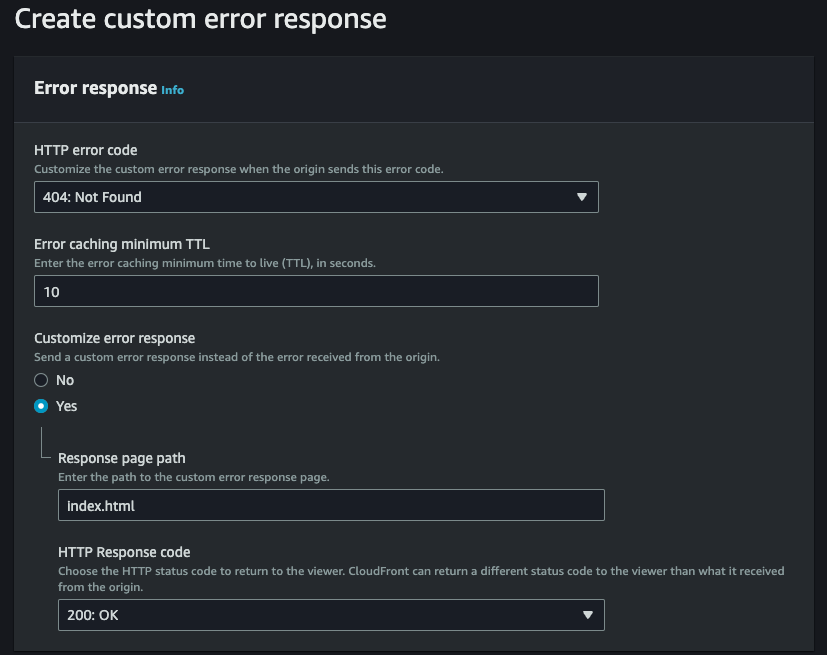
If you visit the app, it points to an index.html file. However, if you visit one of the routes, it will show a 404 error. The reason is that it tries to access a file with such name in our S3 bucket, which does not exist. One of the ways to fix it is to point users to index.html when error happens
Issue with www
Some people might still use www when typing the URL. Unfortunately, by default it will not work with and it will show that the app does not exist. For that reason, we need to create another bucket with a private access and to be able to re-direct.
CloudFront
CloudFront is a CDN that allows you to distribute your files or apps so that users can access it faster.
How CloudFront works
The way CloudFront works is that it reads from the s3 bucket and caches the files on the edge. If there’s no cache, it hits Regional Edge Cache. If nothing is there, it hits the S3 bucket and caches it.
It also ignores requests headers which is what we almost always want. However, some are required (Auth headers for example) so it needs to be allowed to go through.
It also adds some headers when it hits the cache.

What needs to be done in terms of using CloudFront with SPAs
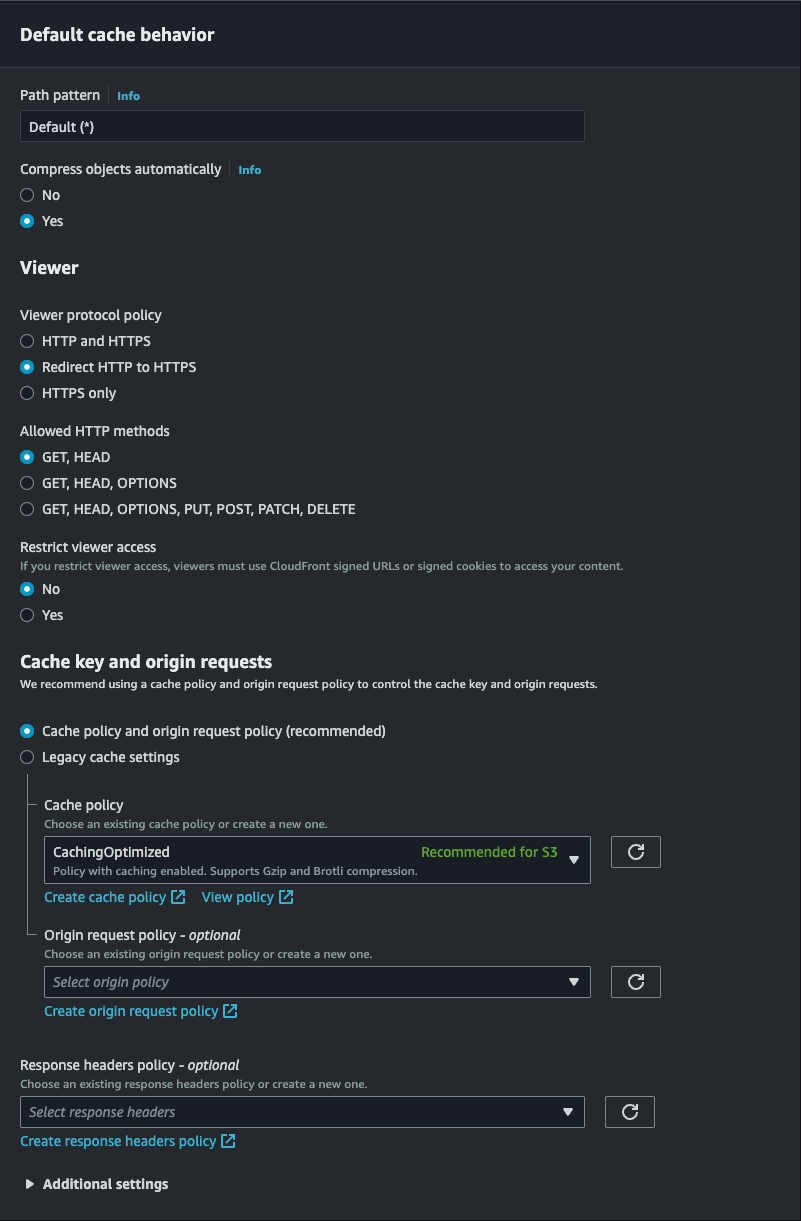
- Create CloudFront Distribution
- Point it to static webnsites on S3
- Add domain names
- G zip assets
- Set default root object
How to create CloudFront distribution
You have to go to CloudFront and Create. Then, you have to select Origin domain and use the URL of the static website not the bucket’s name.
Default cache behaviour
Settings
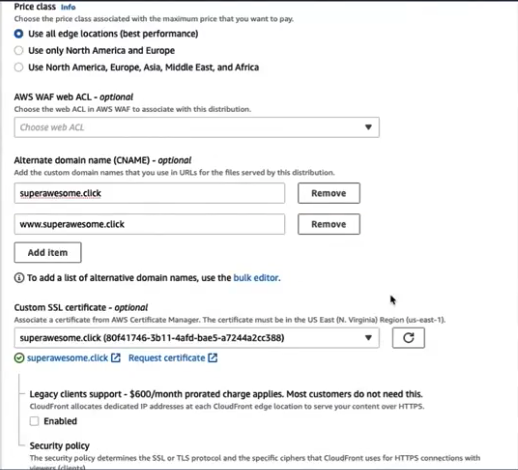
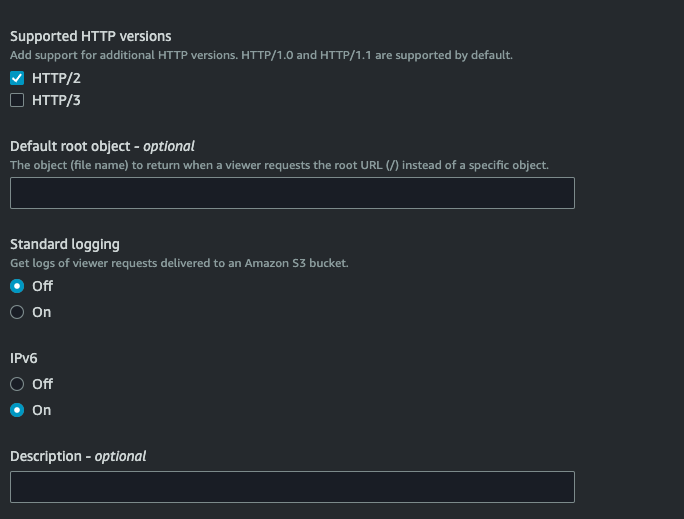
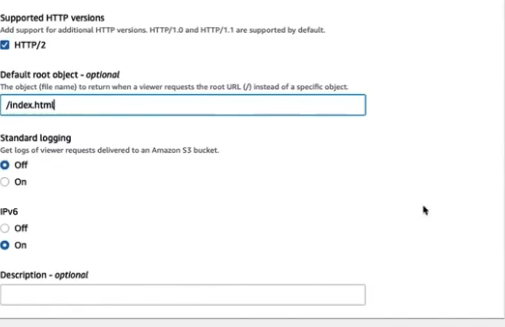
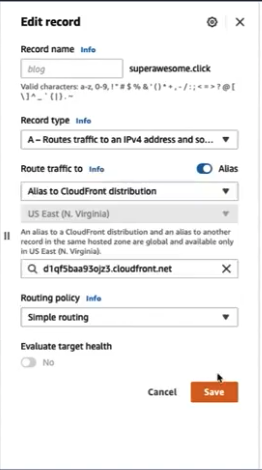
Once the cloudfront distribution has been created, you have to change route53 to point to cloudfront distribution instead of a bucket. The below needs to be done for www as well
OAC
It is a feature that allows CloudFront to serve files from a closed bucket. That means the bucket can be locked out completely.
To set it up, I need to go to CloudFront distribution, origins, change it to bucket’s name and instead of the bucket’s static website URL, select origin access contrtol and add permissions to S3 Bucket!
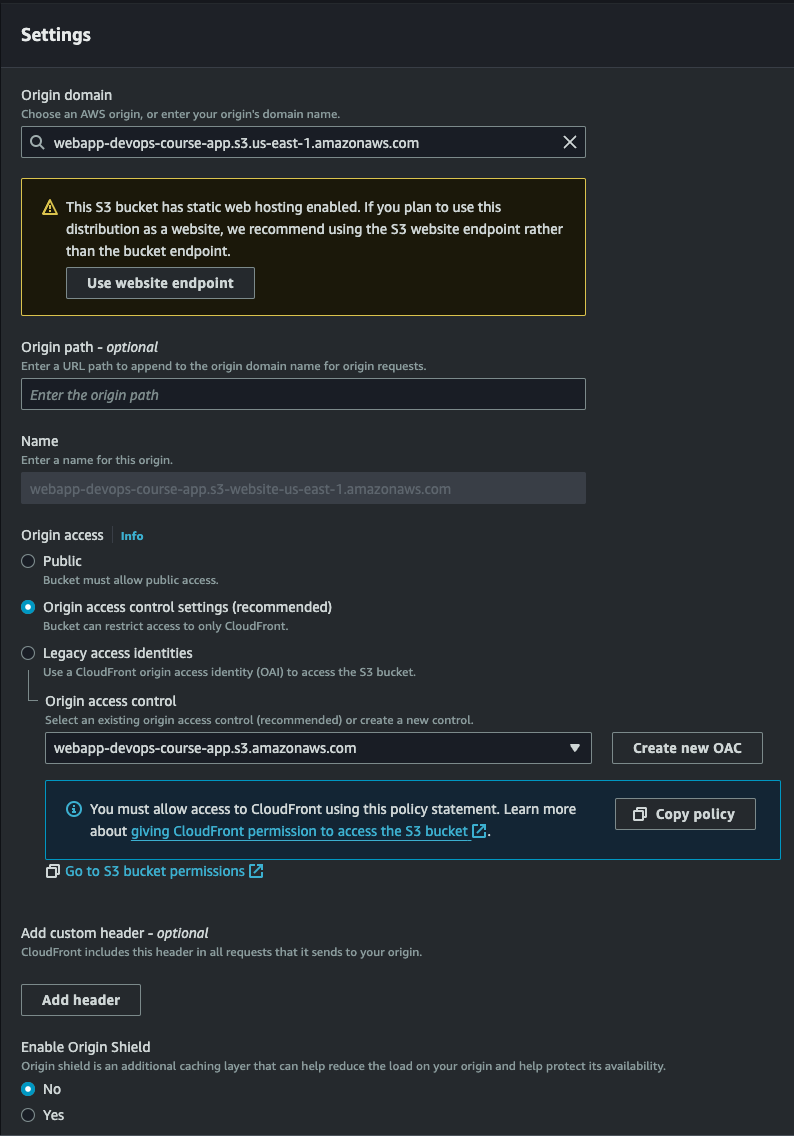
Once that’s setup, I can change the settings of S3, remove Website hosting and make the bucket private.
Cloudfront Routing
The issue that we have now is that Cloudfront, when a route doesn’t exist, it shows an error and we have to make sure it redirects to a correct page. To to that, you have to go to CloudFront distribution, and create custom error responses, and override HTTP response code
Pipeline Caching
By default, when I setup CloudFront and reading from S3, it caches things for 24h. The problem is that if you push new code, it will take up to 24h to display new changes.
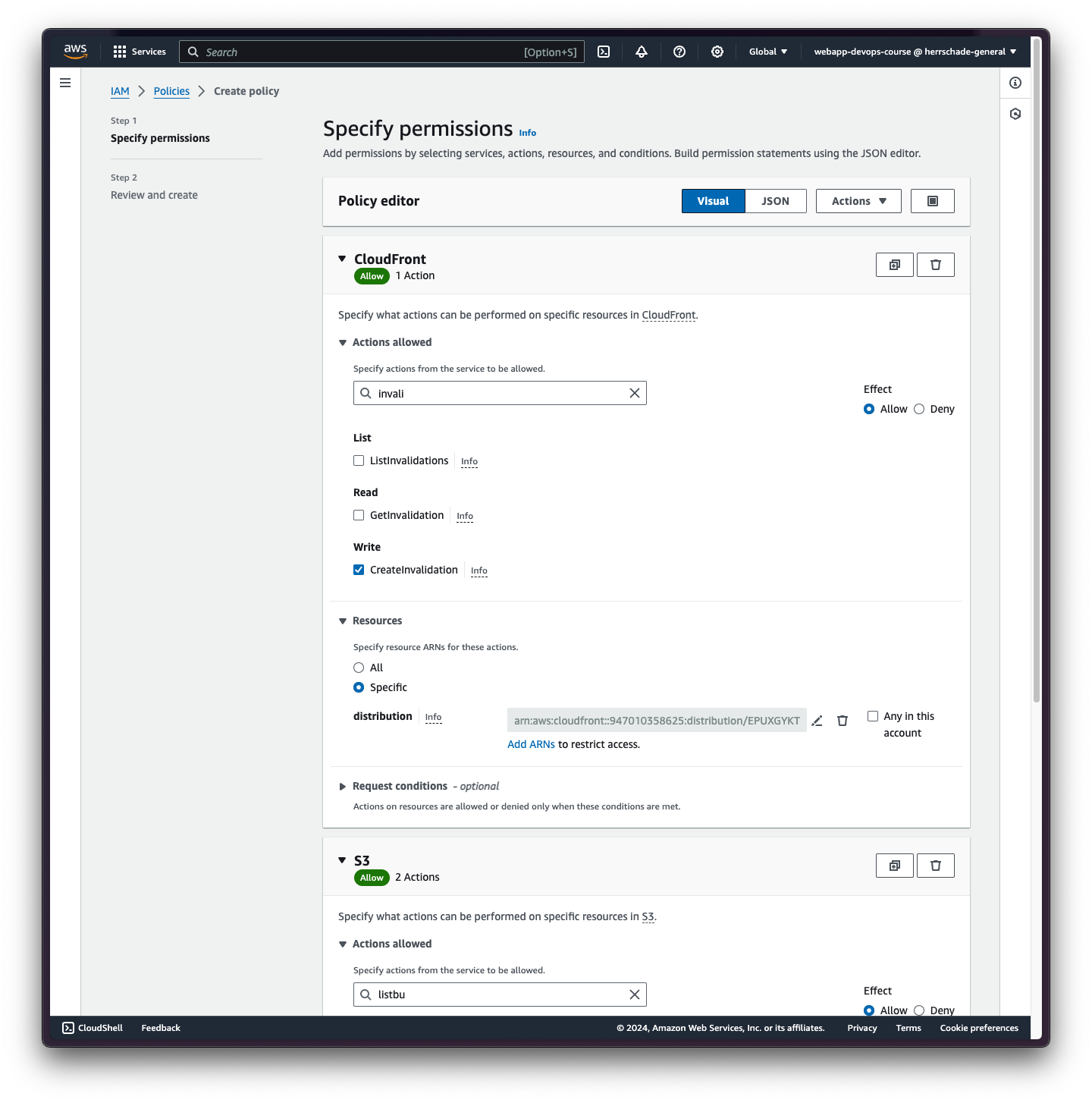
To tell CloudFront to invalidate cache, you have to use Invalidations. To do that, you have to go to CloudFront distribution, go to Invalidations and create invalidation. within that, you provide a path for each object in s3 that you want to invalidate.
IMPORTANT
1000 are for free, and then it’s a fraction of a cent (so not very expensive).
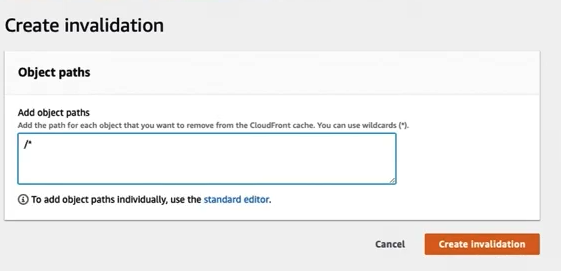
Invalidation should always be done when you push new code, and the best place to do it is while using CI/CD pipeline.
Pipeline
name: Deploy Website
run-name: "Release app"

on:
  push:
    branches:
      - main

jobs:
  deploy:
    runs-on: ubuntu-latest
    steps:
      - name: Checkout
        uses: actions/checkout@v3

      - name: Configure AWS Credentials
        uses: aws-actions/configure-aws-credentials@v3
        with:
          aws-access-key-id: ${{ secrets.AWS_ACCESS_KEY_ID }}
          aws-secret-access-key: ${{ secrets.AWS_SECRET_ACCESS_KEY }}
          aws-region: us-east-1

      - name: Setup PNPM
        uses: pnpm/action-setup@v3
        with:
          version: 7

      - name: Setup Node.js
        uses: actions/setup-node@v3
        with:
          node-version: 20.x
          cache: 'pnpm'
      - run: pnpm install --no-frozen-lockfile

      - name: Build application
        run: pnpm run build

      - name: Deploy to S3
        run: aws s3 sync ./build/ s3://${{ secrets.BUCKET_ID }}

      - name: Create CloudFront invalidation
        run: aws cloudfront create-invalidation --distribution-id ${{ secrets.DISTRIBUTION_ID }} --paths "/*"