TODO
- Homework If you have not done so already, get yourself set up with some tools. Remember, you can choose the built-in tools on your digital devices for now. The important thing is you have a set of tools to begin with. [p. 106]
- Homework Over the next week, monitor the tasks you do at work. Which of those tasks would you consider critical to your work, and what tasks were not? To help you, consider any task delegated to you by your boss or colleague as not being core work. Additional tasks may need doing, as in the example of truck drivers filling out environmental impact and fuel data reports, but they are not your core work. [p. 119]
- Homework So, who are the people you envy? The people doing what you want to do? Research how they did it. Read articles, watch interviews, and learn what they did to become the person they are today.
- Homework Go through your areas of focus again and ask yourself, on a scale of 1 to 10 how you are doing (with 1 being very bad and 10 being perfect). Take the three lowest scores and think what goals you could set for yourself to get these up to at least a 7. Then, add the associated action steps either to your calendar or task manager and set them to recur as often as needed. [p. 133]
- Create a process for Planning your Travelling
Summary
What is COD
- A productivity system that stands for Collect Organise and Do
- You use it to collect things to not forget anything and then, you should have set time to organise everything collected in your task manager, notes app and calendars
Collect
- It means that everything that comes your way and requires your attention needs to be collected in a trusted place, you know it is there
- You should not decide where to put it straight away (unless it is obvious). You should have a primary collection tool
- Primary collection tool is a place where you put things that you need to remember to deal with, but not at the given time. It is something you can trust. It can be a notebook or todolist
- Ideas come at unpredictable times, they are random. You want collection to be as easy as possible without too many steps
- Collection of information should be so simple that you can do it while carrying a bag and changing trains. If it does not allow you to do that, you have to improve it
- You also have to make sure you clear your inbox everey 24-48h, otherwise it will be cluttered
- Default new tasks to
don't need doing this week, because that will help you with “sorting themselves out”
Organise
-
You organise things that you collected and you have to decide what it means to you
-
It is basically about deciding where something should go
- Task: whether it needs to be done this week or can be done later
- Idea for project or a goal: Add this to your project or goal note
- Appointments/event: Go to your calendar
-
Sometimes, something you collected may no longer be needed at the end of the day
-
Don’t keep things that you may need and delete them if they are not relevant anymore
-
Organising should be kept to the minimum amount of time possible, because you want to focus on doing not planning too long
-
If you have situation, where you spend too much time on a project and you don’t know what is its direction and requires thinking, don’t do it as part of organising. You need to create a task for project review. This is part of strategic time.
-
A workflow to follow when organising:
- What is it?
- What do I need to do?
- When do I need to do it?
- Where does it go?
Do
- It is simply just doing things that we planned. It is where you want to have 95% of your time allocated each day, because doing is helping you with projects to be completed, goals achieved etc.
Brain is not a great storage of information
- Brain was not designed to remember things, it was designed to be creative and solve problems
- If you always depend on your brain to do things, you have to brake the habit and replace with new ones and trust the system
- If you don’t do the above, your brain will always think about all the things you need to do and that also everything is important
Prioritisation is a key to successful productivity system
- Lots of inputs come at us daily
- Without priotisation, it is impossible to manage all the work that you have to do, because everything is important when we are under pressure
- If task does not need to be done this week, do not worry about it, you just need to know that this will need to be planned for next week
Time Sector System
- It is a system designed to ensure you are doing what matters so you have more time to do things you want to do.
- It is telling you WHEN you will do the work, not WHAT work you will do.
- Time sector helps you to say no, because you know how much time you have to get things done.
Time Centred Time Management
- The try to fit too much within a day
- Time sector helps with the above
Areas of Focus
- High level parts of your life that are important to you and, when mantained in the way that satisfies how you define time, help you keep life in balance
- The goal of areas of focus is to help you focus and prioritise those things that are the most important to you at the given time
- The most personal area, the more powerful it will be
- Projects and goals will always start from here
Family and Relationships
- This area is about spending time with family and friends, and making sure that we are for those that are important for us, spending enough time with them etc.
- This area is mainly about ensuring that you spend enough time with your close ones
- To make sure this area is satisfied, you should want to schedule time each week for family and friends, or if your family is far away, to make sure you call them
Career / Business
- This area is about knowing what you want from your career, making sure you are on track to achieve the position you want
- Going through motions will not get you anywhere if you do not have goals for your career
- You have to take consistent action each day to ensure you can arrive where you want to be in your career
- When you have clear mission, you will be focused
- If your work mission is centered on serving others, you will most likely have more enthusiasm and energy for work
Finances
- This area is responsible for securing yourself financially and will only be achieved if you take action weekly and monthly.
- You should have long term financial plan
- Making sure that your are on track of your financial plans is not easy, so you should have a weekly or monthly recurring task to check this part of your area
Health and Fitness
- This area is responsible for 3 core things: sleep, diet and movement
- You have to make sure you get min 7h of sleep each night, eat healthy and natural foods, avoid sugar etc.
Spirituality
- it is responsible for everything, not only beliefes and religion
- It can mean going to the temple or just going away and spending some time in nature
- It is more about your mental health and wellbeing
- Meditation is part of spirituality and a few minutes a day can be good
Lifestyle and Life Experiences
- This area is about the things you possess
- It is about places you want to visit, where you want to go on holdiays etc.
- This is a place where you can keep your journal as well
Personal Development
- Education never ends, you learn all the time
- You should have one skill you are developing at any time
- Examples of PD can be learning a foreign language, software, programming language etc.
Purpose in Life
- The hardest area to define
- To help define this area, you can think about
- Why did you decide to do what you do
- What books do you like to read and why
- What articles you like to read the most
- What videos do you watch on youtube and why
- Try to find answers for the above and ask yourself why
Task vs Event
- Example: Exercise is not a task, it is an event
- Event is something that happens somewhere, at certain time and certain place
- Events should be in a calendar
- Task is for example sending certain amount of money to your saving account each month
- Tasks should be in a Todo list
- Those tasks that are part of my Area of Focus should be in Recurring Areas of Focus
Goals
- Many activities and actions steps to achieve the goal will come from my area of focus tasks
- Goal can be anything you make it. It could be going to bed at 10pm and another would be waking up at 6am.
- It is a mechanism to pull you back on course with your areas of focus
- They are not a final destination, those are areas of focus
- Goals can be short and long term
- Example of short term goal is losing weight
- Example of long term could become a consultant suregon at a major hospital
- Those goals that are connected to your areas of focus are going to be the ones you will stick with the most
- The structure of an effective goal is what, why, and how. What do you want, why do you want it, and how are you going to get it?
- Goals probably are already defined in your areas of focus.
- Goals are great pulling you out of your comfort zone and sticking within your comfort zone equals to stagnation or decline.
Smart Goals and Issues
- Smart goals work in an organisation because you have a natural motivation to complete the goal. People push each other to accomplish the goal
- In work environment there’s a carrot stick where if you don’t complete the goal, you could be fired and if you will achieve it, you will get a bonus or promotion
Misc
- To experiment with your night sleep, set no alart for seven days and you will know how much sleep you need
- Your productivity system should not bt the place you come and procrastinate.
Tools of Productivity System
Task manager
- Only for tasks, not events
- Things that are actionable
Setup
- This week - if you put here, you have to decide whether you have time to perform it and how urgent it is
- Next week
- This month - non-urgent tasks that you want to complete this month
- Next Month - Tasks that you want to keep around to do at some point in the future
- Long Term/On Hold - Tasks that don’t have to be done in the next 3 months or longer, and everything that has been put on hold indefinitely, but you want to keep it around as a reminder
- Routines - Maintenance tasks that you have to do daily, weekly or monthly and have no impact on your goals or projects. Tasks that are just to maintain our lives like washing car, cleaning the house, laundry, grocery shopping etc. Don’t add natural triggers here.
- Recurring Areas of Focus - Tasks and activities that are part of area of focus. This can be calling your parents, personal development studying, planning holidays etc. Everything here should be treated as top priority.
Calendar
- Things that have set deadline and start at certain time
- Appointments etc
- It is a critical tool for your core work because it helps you to get your work done and it helps you to make sure you have time to do it
Notes app
- Projects and your notes about topics you are learning etc.
Setup
- Goals - Note with all goals
- Areas of focus - Note with the statement. You can also add notes, ideas for each area of focus
- Projects
- References
- Archive
Identifying tasks vs projects
- To Identify a task you have to identify what needs doing and when
- You also have to identify what you have to do to clear the task
- If your task is setup Agile in your organisation, this probably is a project and you need to find time for a project and create tasks for this to be completed
Natural trigger is a task that have a natural trigger. For example, washing your car is a task that you don’t do routinely, so you don’t have to have a recurring task
Time Blocking
It is allocating blocks of time to do specific type of work. It doesn’t mean blocking time to write an individual email, but to do certain type of tasks. It can be a project etc.
- It should be for the essential things (non-negotiables)
- once you have planned your day and the week, you should stick to it unless emergency happens
Core Work
- Any activity that gives you the results you are employed to achieve
- To understand your core work you have to look at your responsibilities and you will find that either in your job title, job description or annual evaluation report
- Your core work tasks could/should be in your task manager
- Core work should come first, then everything else (like messages, scheduling meetings etc.)
Leaders and Core Work
- To define core work of a leader, you have to check how your leadership role is defined
Writing Tasks
- Write tasks for your future self and provide enough information
- If your task is actionable and you know what needs to be done, then all is good. If you don’t know what you need to do, then you need to rewrite it to make it clear
- Don’t add tasks that are natural triggers like taking bins out, doing the washing etc.
Recurring Areas of Focus
- Those are tasks that are related to your Areas of Focus.
- These could be your long term projects you are working on
- Those can be tasks that have to be done on a frequent basis like generating a report for your boss or arranging meetings with your team
Process vs Project
- Project is a thing where you have more than one task that help you achieve your goal. It usually involves planning
- Project is a one-off with multi steps
- Process is something that needs to be done multiple times and requires more than one step
- Projects can be a waste of time and can lead to procrastination
- Process help you to start much sooner, because you know what needs to be done, you just need to know when
Planning
Daily Planning
- It should be 10-15 minutes at the end of the day
- You have to sort your tasks that you collected througouht the day, tasks that you scheduled for next day and check if they are still relevant.
- if you haven’t completed some of the tasks, you just move them for tomorrow or, if you cannot complete them this week anymore and they are not important, move them over to next week
- At the end of the day, use 2 + * method and select 2 objectives and 8 should to tasks, review your calendar for events and make sure you know where you need to be etc
- Daiply planning should be done a day before because it sets you up for next day and you are not wasting time in the morning for planning when you are fresh and focused.
2 + 8 Prioritisation method
- It is a method that selects two objective tasks that MUST be completed and 8 tasks you will do whenever you can.
- Those 8 are important but the world is not going to end if you won’t do them and you can reschedule for next day
Weekly planning
- This should be the moment where you give your week a focus and it should help you with accomplishing what you set out to accomplish
- If you have a project that involves a lot of consistent work, add it to your task as everyday and recur as frequently as necessary.
- When planning, ask yourself 3 simple questions
- what do I want to accomplish this week
- What must be done
- What do I want to make a significant progress on
- When you work on a project and tasks need to be done at specific times this week, move these tasks to your task manager
- Conditional tasks (tasks that depend on another task), should stay in your project note, because you don’t know what will be the next step.
A checklist for Weekly planning:
Clear task manager’s inbox.
Review calendar for appointments and commitments for next week.
Review master projects list.
Review This Week folder for tasks not completed (why were they not completed?).
Review Next Week folder and move tasks for next week into This Week’s folder and date the tasks.
Review This Month folder and move any relevant tasks to This Week.
Weekly Planning Matrix:
- Core work tasks sit on top level box and don’t change on week-to-week basis
- Projects/Issues - only care about what projects and issues need your attention next week. Don’t think what will happen a week after.
- Personal - Personal Areas of Focus and personal tasks/projects that you need to do next week like arranging holiday, meeting a friend etc.
- Radar - Things you need to keep an eye on in the near future. It could be projects you are overseeing etc.
- Core work will be fixed, the rest will change.
Avoid tweaking and fiddling your setup
- You want to avoid playing with your setup constantly, because it is essentially procrastination
- If you want to review your setup, create a note where you can keep your productivity ideas and create a task once a month or so to go through your current setup.
Processing your email
- Processing should be done in the morning
- processing is deleting, archiving and moving actionable emails to your appropriate folder
- Your inbox is a sacred territory, and no email should remain once looked at it.
- When you check your email, you should decide straight away what you want to do with it (where it goes, what it is)
- There are three places an email can go
- Trash - You don’t need it anymore
- Archive - You don’t need it, but you want to keep it just in case
- Action This Today - You want/need to respond or do something with it by the end of the day
Highlights
COD productivity system. COD stands for Collect, Organize, and Do, and every sound productivity system has this at its core; it’s nothing new. You need to collect all the inputs you receive in a trusted place — a digital inbox in your notes app, a task manager, or a simple notebook. No matter what tool you use to collect all these commitments, events, and ideas, you need to trust that you will collect everything there. Then you set aside some time to organize everything you collected. Where will you put it so you will not forget it? For that, we have task managers, notes apps, and calendars. And finally, you need to be doing the work. Nothing else matters if you have an excellent collection system and everything is beautifully organized, but you aren’t doing the work, you are procrastinating. All systems require you to be doing the work. [p.19]
To counter this, I realized that prioritization was the key. Enough inputs are coming at you daily to fill up a whole month of work. It would be impossible to manage all that work if you do not start to prioritize what you need to do. Once you know what is important, the only thing you need to know is when a task needs doing. If a task does not need to be done this week, don’t worry about it. All you need to know when you plan your week is what needs to be done this week to have a successful week. And this is where the Time Sector System comes in. The Time Sector System manages your tasks by when they need to be done. [p.20-21]
Task Centred Time Management
problem that has deeper roots. Our time management issues are caused by trying to fit in more than we have time for. [p. 24]
What the Time Sector System will not give you is more shiny tools to play with. The Time Sector System is a system designed to ensure you are doing what matters so you have more time to do the things you want to do. It will work with almost any time management and productivity tools you are using today, and it will grow with you as you grow. [p. 28]
The Eight Areas of Life
Areas of focus are the higher-level parts of your life that are important to you and, when maintained in a way that satisfies how you define them, help you keep your life in balance. [p. 32]
Let’s look at the eight areas of focus: Family and relationships Career/business Finances Health and Fitness Spirituality Lifestyle and life experiences Personal Development Purpose in life [p. 33-34]
Wherever you are in life, your areas of focus will be prioritized towards what’s most important to you right now. [p. 35]
Family and Relationships
This is about time spent with your family, making sure you care for those important to you and being there for them; spending enough time with your partner, children and parents. It should go without saying that your family and friends are important but given how important this area is, how much of your time and attention do you spend in this area? Where you can improve here is how much time you spend with your family and friends. To do that, you will want to schedule time each week with your family or if you live a long way from your parents, ensuring you call them frequently. [p. 35]
Career/Business
What do you want from your career? Are you on track to achieve the position you want? Or, if your goal is to build your own business, are you doing everything you can do to accomplish that? To reach an executive level within your company, what skills and professional qualifications do you need? Turning up at work daily and going through the motions will not get you where you want to be. Instead, taking consistent, positive action each day is the only vehicle enabling you to arrive where you want to be with your career. [p.36]
When you have a clear mission for your career, you will be focused. You will see your work as important, and you will do whatever you can to ensure you complete your mission. [p. 37]
What you will find is if your mission at work is centered on serving others, you will have more enthusiasm and energy for your work than if your motives were financial or status. [p. 37]
Finances
Securing your financial area will only be achieved if you take action weekly and monthly. Planning your long-term financial future can easily be neglected, but having a recurring task each week or month reminding you to take action will keep this area of your life under control. [p. 39]
Health and Fitness
If you want to get on top of your health, there are three areas to focus on — sleep, diet and movement. If you get between six and eight hours of sleep each night, eat healthy, unrefined, or natural foods, and avoid sugar, you will see huge benefits to your overall productivity. If you don’t know how much sleep you need, do an experiment and sleep with no alarm for seven days. Note how much sleep you get each night and average it out. [p. 40]
Spirituality
This area involves everyone, no matter what your religion or beliefs. Your spirituality could mean you find time each week to go to church, temple, synagogue, or mosque, or it may simply mean you get outside and spend some time in nature away from all the digital demands on your everyday life. The time you have away and being alone will do wonders for your overall mental health and wellbeing. At a minimum, you might try spending a few minutes each day meditating or relaxing in peace and quiet. [p. 42]
Lifestyle and Life Experiences
Life experiences, the places you visit, and where you go on your vacations are all important and need to be a part of your life. Our lives are built on the experiences we have. Do you have a place-to-visit list? This is one of the best lists you can keep in your notes (or journal). Each year, you can look at this list and consider one of those places as a possible vacation destination that year. [p. 44]
Personal Development
It is a mistake to believe that once your formal education ends, that’s it. The reality is that it’s just the beginning. It’s now up to you to build on those foundations, whether through university education or using those skills as a platform to achieve greater things. You should always have one skill you are developing at any time. That could be learning a foreign language, a musical instrument, or a piece of software. [p. 44]
Find something you are curious about and dig deeper. The more you read, the more you will develop your skills because you don’t just learn from your mistakes; you can learn a lot from the mistakes of others. [p. 45]
Purpose in Life
There are a few questions you can ask yourself that may help you find your purpose: Why did you choose the career you are in? What books do you like to read? What articles are you drawn to in the newspaper? What videos do you find yourself watching a lot on YouTube or elsewhere? From your answers, ask yourself why. [p. 46]
You will want to define what each area means to you. The more personal you can make it, the more powerful each will be. This is about how you see yourself — your internal identity, if you like — and when your daily actions and activities match your inner identity, that’s when you experience balance. [p. 46]
Exercise is not a task; it is an event. [p. 49]
identifiable tasks that need doing such as sending an amount of money to your savings account each month, you would add them as a task to your recurring areas of focus section in your task manager. When we look at goal setting, you will notice many of the activities and action steps you identify will come from your areas of focus tasks. It’s natural that your long-term goals and your areas of focus will interconnect on some levels. For instance, if one of your long-term goals is to have the freedom to travel the world when you finally stop working, building enough of a financial base to allow you to do that would be important. That will come under your finance areas of focus. [p. 50]
Carl Pullein. Your Time, Your Way by Carl Pullein (p. 50). Kindle Edition.
Work projects will be different because there will be other people holding you to account to do your job (your relationships area of focus), [p. 51]
When you decide to get yourself organized and in control of your time, it is important to clear the decks, and that means before you start, you clear what you currently have ongoing. That does not mean you continue to accept new tasks and commitments. It means you draw a line on any new inputs and clear the backlog. [p. 53]
4 Tools you will need
A Task Manager
You need your task manager to be simple, so the only thing to think about is what a task is, what will be required to complete the task and when you will do the task. [p. 60]
The basics of A Productivity System: Collect, Organise, Do (COD)
Collect
attention needs to be collected into a trusted place. As you now know, we have three places where we can put this stuff: your task manager, your notes, or your calendar. As stuff comes in, we can decide where best to put it. A task would go into your task manager, a meeting would go on to your calendar, and an idea would go into your notes app. That’s reasonably straightforward, but “stuff’ doesn’t always conform to neat, tidy pockets. Often, something could be considered an idea or a task. An idea, for instance, for a project you are currently working on could be a task or a note. When something like this comes in, it is not always clear where to put it. When this happens, it’s easy to waste a lot of time trying to decide. [p. 68]
Primary Collection Tool
The solution to this is when something comes in you need to remember; the goal is to collect it, not necessarily make a decision about it right there. If something is obvious, for instance, a meeting appointment, then that can be put on your calendar, but if it is not obvious, you need to decide what your primary collection tool will be. My primary collection tool is my task manager. [p. 68]
Your best ideas will not come at predictable times. They are random and, in my experience, usually come at you through the three “B’s” — bed, bath or bus — in other words, you are likely to be doing something unconnected to your work or projects, and an idea will strike. [p. 69-70]
Organize
So what do you do with all this stuff you collect? Organize it. But before you can do that, you should decide what it means and what needs doing. You will find you often collect something early in the morning, and when you process what you collected, you decide you no longer want or need to deal with it, you can delete it. Never be afraid of the “delete” key. It is your best friend. The more you delete, the less you have to do, and the less gets into your system. Organizing your collected items simply means you decide where something will go. For your tasks, you decide whether it needs to be done this week — in which case, which day this week will you do it? — Or next week, this month, next month or sometime in the future. Once you’ve decided, put the task in the appropriate folder in your task manager. [p. 70]
A simple way to keep your project notes clean is to avoid sending a whole email to your notes. Instead, just copy and paste the relevant information in the email to your notes. In most email apps, you can also link back to the original email if you need it. And for any appointments you collected, you can add them to your calendar. [p. 70]
If a project has become stuck and directionless and requires some thinking, that would be a task. You would add a task such as “review project B to see how to move to the next step.” In this situation and other similar situations, that’s not going to be considered organizing time; that would be strategic time. After all, sometimes we do need to step back and think about what needs to be done next on a goal or a project. Here’s a simple workflow for you to follow: What is it? What do I need to do? When do I need to do it? Where does it go? [p. 71]
Do
you have an idea or you remember a task you have to complete, can you get it into your system while carrying a bag and changing trains? If not, your collecting system is not good enough. Work out what you have to do to make it better. [p.74 ]
The goal is to spend no more than 20 minutes each working day on processing and organizing and seek out ways to reduce that time still further. [p. 75]
Setting up the time sectors
The principle is the only thing that really matters is WHEN you will do the work. It doesn’t matter what work you have to do; the only thing that matters is WHEN you will do it. [p. 76]
The second area that the Time Sector System will help you with is focusing on the week you are in rather than worrying about anything that doesn’t need doing this week. [p.77-78]
A trick I would encourage you to try is to default new tasks to “don’t need doing this week.” [p. 77]
This Week and Next Week folders are obviously for tasks you want to, or need to, perform either this week or next week. How you decide will depend on two factors: 1) the urgency of the task and 2) the time you have available to perform the task. [p. 79]
The principle behind the Time Sector System is that there are only two things you need to know about a task: 1. What needs doing? 2. When does it need doing? To deal with the first part, “What needs doing?” All you need to decide is what you have to do to be able to clear the task. For instance, “read through the article on implementing Agile structures in an organization” This task requires you to read through an article. It’s likely to take you ten minutes. It’s not urgent but does need reading before your meeting next week on Thursday. [p. 80]
This month and Next Month
Your Next Month is used for tasks that you want to keep around and that you would like to complete at some point in the near future. These could be tasks you may be waiting for someone else to make a final decision about, or it could be something like a reminder to take your lawn mower in for a service before Spring arrives. [p. 81]
Long Term and On Hold
This folder is for all those tasks that are not due for consideration in the next three months or longer and anything that has been put on hold indefinitely but you want to keep around for review purposes. [p. 81]
Routines
Natural triggers Some routine tasks do not need to be in your routines folder. These are tasks that have a natural trigger. For example, I previously mentioned washing your car; in reality, washing your car has a natural trigger. Every time you go to your car, you will see it is dirty and needs washing. It’s likely you do not need to have a recurring task reminding you to wash it. Instead, you could simply block an hour out on your calendar for washing your car as and when you feel it needs doing. Similarly, cleaning up your computer’s desktop. This is something you can see every time you work on your computer, and you could do it in between sessions of work. [p. 82]
Recurring Areas of Focus
This is where you put tasks and activities you have decided are part of your areas of focus. These want to be dated and set to recur as often as they need recurring. Things like arranging a three-monthly meeting with your financial advisor, calling your parents and siblings, doing your personal development studying, and planning your next vacation would be placed inside your Recurring Areas of Focus folder. The tasks you put in here should have a priority; after all, you have identified them as being important to you. There really is no excuse for not making sure they are appropriately prioritized. [p. 82]
quick trick if you need to block a day or two for deep, focused work on a project is to plan ahead. Trying to find a day or two next week on your calendar will likely be difficult — almost impossible. However, if you block a day or two out in a month’s time, you will find the time a lot easier, and it’s much easier to plan ahead and tell people you won’t be available on a given day next month. Anything inside your Recurring Areas Of Focus folder should be treated as a priority. [p. 83]
Folder Structure in Notes App
Goals
Having a folder where you can keep notes related to your goals and to track progress is helpful. A goal is a catalyst for change. Whether you want to reach a particular position within your company, get fit and lose weight, or be in a position to take a month off to travel through Australia, having a place in your notes where you can keep ideas, plans, and track progress is a great way to keep yourself motivated. Bigger goals may require their own folder, and in most notes apps, you can create sub-folders for these. Smaller goals may only require a single note. You can keep your bucket list here too. Most notes apps give you the option to maintain checklists; these are great for things like bucket lists because as you check items off, they either grey out or have a line through them. This is different from how task managers work, where when you check things off, the task disappears. [p. 88-89]
Areas of Focus This is where you keep clarifying statements for your areas of focus. While the tasks related to your areas of focus will be inside your task manager, you may want to keep your areas of focus statements in a place where you can review these periodically. I recommend you review your areas of focus every six months or so to ensure you are in balance and that you are not neglecting anything. Sometimes, we become so absorbed in a project or even an emergency that we inadvertently begin to neglect an area of focus. Reviewing your areas every three to six months as part of a weekly planning session will keep these in mind and in balance. Your areas of focus will change over time as you go through life. Having a place where you can add notes, thoughts, and ideas will make your areas of focus folder a reassuring place to spend time. In a way, you can use this area of your notes as a journal for your thoughts over time about particular aspects of your life. [p. 89]
Projects This is where you keep all your projects. Some projects may require sub-folders because of their size, while other smaller projects will only require a single note. I don’t advise you to separate work and personal projects unless you have no choice. A project is a project (just like a task is a task) and needs doing. The only difference between work and personal projects is the time you will work on those projects. While you are working on a project, you have the project folder open, so you do not see your other projects. [p. 89-90]
Reference
This is where notes, web pages, and other things you want to keep for reference go. For example, my business involves online courses and coaching. I have a sub-folder dedicated to these subjects in my reference folder. I also have a folder for productivity, goal planning and time management articles I find interesting. These are all related to my work, and I may find these articles as sources of inspiration one day when I am trying to solve a client’s problem or looking for a new topic for a blog post or YouTube video. For your personal life, you may find a suppliers list that details where you can buy items of clothing, which includes your sizes for each supplier useful. You might also have copies of your passport, ID card and other things you may need at a moment’s notice. You can also store quotes you want to keep, notes you may have taken while on a course, and ideas you may have for future vacations. On a day-to-day basis, you will find you work more from your notes app more than any other app. When you are working on a project, you will have that project’s note open, and any ideas you have, questions you may want to ask a colleague, or interesting articles that may help move the project forward can be put there. [p. 91-92]
Archive
Your archive folder is for all the notes you have finished with or for things you collected that you once had an interest in. An archive is not a glorified trash can. It’s a treasure trove of history. If you create an archive notebook or folder in your digital notes, you will be creating your own digital archive. [p. 92]
When do you transfer tasks to your task manager?
If you are in a project meeting, give yourself a couple of minutes after the meeting to transfer any tasks that need doing to your task manager’s inbox. These could be things like “send Patricia a copy of the project outline” or “update the project status in the Excel file.” These tasks have a timeline. It could be you promised to send Patricia the project outline later today/tomorrow, or the project leader asked you to update the Excel file. If you left a task like this in your project note, you are not going to see it until you next work on that project, which could be days later. [p. 94]
In the chapter on your goals and areas of focus , I mentioned that if one of your areas of focus was to be fit and healthy, you can schedule this on your calendar. When will you do your exercise, and how frequently? This would be something you put on your calendar, not on your task list. [p. 97]
The way to look at this is if something needs a given amount of time and must be done at a specific time, then it goes on your calendar. [p. 97]
time blocking. What is Time Blocking? Time blocking is simply allocating blocks of time to do specific types of work. This does not mean you block time out to write an individual email; if you do have an email to write, you block out time on your calendar for “Communications,” where you can deal with all your emails in one block. Likewise, if you have an important project to complete and know you will require around three hours, block that time out on your calendar. You only need to select a three-hour block (or two ninety-minute blocks) and call it “Project work.” [p. 101-102]
Time blocking means you block out time for the essential things that need to be done -the non-negotiables. [p. 103]
an end-of-day planning session, you look at your appointments for the next day, and if you see a conflict or you realize you may be being a little too ambitious with your commitments, you can move things around. [p. 104]
trick. Once you have planned out your day and committed to all the events on your calendar, they are now fixed unless an absolute emergency happens. [p. 104]
Your Task Manager
This is where your tasks will go. You use your task manager to decide which tasks you need to complete and which ones you need to work on this week. This is broken down into individual days. Your task manager takes care of the micro-level activities of your day. You are unlikely to complete all your assigned tasks each day, and that is fine. From now on, you want to see things as “these are the tasks I want to complete this week.” If you don’t complete all your Monday tasks, you can move the remaining tasks off to another day that week.
Your Notes App This is where you will manage your goals, areas of focus, and projects. Each goal, area, and project will, at the very least, have its own note. If the goal or project is large, you can create a sub-folder to keep all the various materials you need. Inside your notes, you will store images, screenshots, pasted snippets of information, and important emails related to the project. When you are working on a project, you will have the project note open, and you can work from there. Your task manager just tells you, “Continue work on project X.” You then will come to your project note and begin work.
Your Calendar This is the tool that ensures whatever you put in it gets done. No excuses! If you have scheduled a two-hour Spanish language study session at 6 pm and you come home tired; no excuses. Get your books out and study. Remember: What goes on your calendar gets done. (Although what is important here is not the time; it’s that you do the studying. If you can only manage one hour, that’s great. You did some studying). Your calendar reassures you that you have the time [p. 104- 105]
Homework If you have not done so already, get yourself set up with some tools. Remember, you can choose the built-in tools on your digital devices for now. The important thing is you have a set of tools to begin with. [p. 106]
Your Core Work
If you are employed as a salesperson, you are hired to sell your company’s products or services. Your income will likely be determined by how much you sell, whether you are paid a commission or a bonus for exceeding your targets (or both). Any activity that directly or indirectly leads to a sale would be important. Therefore, any activity that puts you at risk of making a sale would be considered a core work task. [p. 108]
Your core work is any activity that gives you the results you are employed to achieve.[p. 108]
The best way to understand your core work is to look at your responsibilities, and you are likely to find that either in your job title, job description or annual evaluation report. [p. 108]
Establishing your core work is very similar to triage. Multiple tasks are coming at you throughout the day, and you need a process where you can quickly assess the importance of each task and make a decision about when (or if) you will do the task. For example, if you were a screenwriter, your core work would be writing scripts. Deadlines are tight, and producers and directors request scene rewrites daily. If you were receiving emails and messages about your availability to write more scripts, these messages would not be your core work. They are important but not your core work. Responding to these messages could be done between your writing sessions, or you may dedicate an hour at the end of the day to deal with these [p. 112]
To keep your core work front and center of your day, the tasks that trigger you to do the necessary work can be placed in your task manager. [p. 112]
Make use of your Calendar
Your calendar is a critical tool for your core work because this is the work that must be done—it is what you are employed to do. Using your calendar is the best way to ensure you have the time to do this critical work.[p. 113]
Core work comes first, then everything else. [p.114]
Leaders and Core Work
However, when faced with unclear core work tasks, an excellent place to go is how the individual leadership role is defined. [p. 114]
Business owners and Core Work
Homework Over the next week, monitor the tasks you do at work. Which of those tasks would you consider critical to your work, and what tasks were not? To help you, consider any task delegated to you by your boss or colleague as not being core work. Additional tasks may need doing, as in the example of truck drivers filling out environmental impact and fuel data reports, but they are not your core work. [p. 119]
Why set goals
A goal can be anything you make it. You could make it a goal to go to bed at 11: 00 pm tonight or to wake up at 6: 00 am. These are both goals. [p. 120]
The best way to look at a goal is as a mechanism to pull you back on course with your areas of focus. Goals are not the final destination, that is reserved for your areas of focus [p. 120]
Goals can be short-term, such as losing a little weight, or a longer-term goal, to become a consultant surgeon at a major hospital. But what you will find is the goals you stick with are the ones that are connected in some way to your areas of focus. [p. 120]
The structure of an effective goal is what, why, and how. What do you want, why do you want it, and how are you going to get it? [p. 121]
The good news is if you have spent time developing your areas of focus, you will already have your why. Your why is the definition you gave to each of the eight areas of focus. [p. 121]
The problem with SMART Goals
Setting SMART goals can and does work inside a company, and the reason for that is why SMART goals don’t work for individuals. Within an organization, you have a natural motivation to complete the goal. A boss and colleagues will typically push each other to accomplish the goal. Failing that, there is the carrot-and-stick approach, where if you don’t complete your goal, you could be fired, and if you do achieve it, there will be a bonus and perhaps a promotion. [p. 122]
Setting goals is important for another reason: goals pull you out of your comfort zone. Getting stuck inside your comfort zone leads to stagnation and decline. [p. 122]
If SMART Goals Don’t work for an Individual
These questions are designed to get you to think beyond the next few months or years. The questions are: What do I want to do? Who do I want to be? What do I want to see? What do I want to have? Where do I want to go? [p. 123]
Let’s break these down. What do I want to do? This does not just relate to your career; it also relates to the things you want to do outside work. Go skydiving, drive a World Rally Championship car, learn to ride a horse, learn dry-stone walling, complete an Iron Man Triathlon, do amateur dramatics, write a book, or start a podcast. The list is endless. [p. 124]
Who do I want to be? What kind of person would you like to be? Be careful here; it’s easy to come up with standard adjectives to describe something. You want to be thinking in terms of who you really want to be. Being generous, kind and loving is likely to be top of everyone’s list. But what about hardworking, curious, organized, diligent, relaxed, minimalist, inspiring to others, charitable, strong leader, healthy, fit, and strong? There are countless adjectives you could use to describe the kind of person you would like to be. To become that person, what are the traits you could adopt? [p. 124]
What do I want to see? Similar to the question of where you would like to go, but more specifically, things you would like to see. Perhaps you would like to see the Northern Lights in Tromso, Norway, or Victoria Falls in Zimbabwe. The world is an astonishing place with so many incredible spots; let your imagination run wild. [p. 124]
do I want to have? This is the material question. Ignore the people who are anti-materialistic; setting a goal to buy an expensive watch or perhaps a boat can add a little spice to your life, and materialist things can be very motivating. It’s true they rarely bring fulfillment, but as long as you are working on other areas in your life, then a few materialistic goals will not harm you in any way. [p.124]
If you struggle to come up with some ideas, there is a more powerful way to discover what you want, and that is to ask yourself who you envy. [p. 125]
Envy is a Really Good Motivator
Envy is where you see how someone else lives and want to have the same. Jealousy, on the other hand, is bad. [p. 125]
Jealousy is where you believe it’s unfair that someone else has something you do not have. Jealousy leads to bitterness and excuses. Envy gives you inspiration and motivates you to work hard and do things differently. It’s the “if they can do it, so can I” mentality. [p. 125]
to achieve it.”–Jim Rohn What kind of person lives in your ideal home? What kind of person drives the car you want? These questions move you towards discovering the changes you will have to make in your life for you to achieve those things. [p. 125]
Homework So, who are the people you envy? The people doing what you want to do? Research how they did it. Read articles, watch interviews, and learn what they did to become the person they are today. While you are not trying to be them—you want to remain who you are—their mindset, habits, and routines will tell you what you need to do to become like them so you can achieve the things you want for yourself and others. It’s the blueprint you discover from researching these people that will give you the what and the how of your goals. It will also give you the behaviors you either need to change or adopt. Create a note in your notes app and list out the qualities, habits and daily practices that got these people to where they are today. [p. 127]
How does this work in the Time Sector
How Does This Work in the Time Sector System? Once you have decided what needs to change to become the person you want to become, think about what you would need to do to make that happen. For instance, if you are inspired by those who wake up early and go to the gym or out for a run, you could open up your calendar and block an hour each morning for exercise. [p. 130]
If your goal is to become a habitual reader (linked to your self-development area of focus), when will you read each day? [p. 131]
To bring goals into your Time Sector System, what are the actionable steps you have identified? With meditation, your sessions go into your calendar—meditating is an appointment with yourself that usually involves being in a specific place. [p. 132]
What about longer-term goals? Career or financial goals? If you consider these, you will notice that to achieve them, there will be actions you need to take consistently. Saving [p. 132]
Having goals is good because they give you a sense of purpose. To make a goal worthwhile, you must treat it as a catalyst for change. It’s an engine burn to put you on the right course. Effective, motivating goals should be linked to at least one of your areas of focus, whether that is your health, your career or even a lifestyle change such as moving to a bigger home. [p. 133]
Homework Go through your areas of focus again and ask yourself, on a scale of 1 to 10 how you are doing (with 1 being very bad and 10 being perfect). Take the three lowest scores and think what goals you could set for yourself to get these up to at least a 7. Then, add the associated action steps either to your calendar or task manager and set them to recur as often as needed. [p. 133]
How to write your tasks
How to Write Your Tasks Before you do that, think about how you will write your tasks. Writing something like “garbage” or “Mortgage” may make sense to you right now, but next month on your daily list, this may not seem so clear. Always write your tasks with an action verb, something like write, take, call, pay, send, review, etc. So, for your mortgage payment, you would write “pay the mortgage,” and for your garbage, you would write “take the garbage out.” [p. 135]
Think about and Devide on Tasks
This is why when writing a task, you write for your “dumb” self while being your “intelligent” self. This means you make it very clear what you mean and precisely what the action is when you write the task. [p. 136]
However, there is a type of task you will likely put into your task manager that isn’t a task. These tasks begin with words such as “think about” or “decide.” [p. 135]
It’s unlikely you need any major restructuring; simply look at how you write your tasks. When you look at a task, do you instantly know what needs to be done? If the answer is yes, you’ve got it. If not, then consider rewriting the task so it is clear. [p. 137]
Avoid filling your task manager and calendar with tasks and events that do not need to be there. If you do something every day or week, or month without the need for a reminder, don’t feel obligated to get it into your system. Personally, I don’t need to remind myself to put my garbage bins out each week. There’s a natural trigger. All my neighbors put theirs out. When I see their bins are out, I remember to take mine out. [p. 138]
Recurring Areas of Focus
Many of your project tasks will be going into the time sectors, but there are some project tasks that may qualify for entry into your recurring areas of focus. These are the longer-term projects you are working on. If you have an important work project involving changing the payroll system for your global company that has been designated as a two-year project, there are likely to be a number of tasks that need to be done on a frequent basis. If you are in charge of this project, you may need to report progress to your boss on a consistent basis and arrange update meetings with your team. These recurring tasks can be placed inside your recurring areas of focus. The project is long-term and important, and these tasks are recurring tasks. [p. 141]
Long term and On Hold
The whole point of the Time Sector System is to remove from view anything you do not need to do this week. [p. 144]
Process vs Project
view your work? A few years ago, I discovered if I treated everything that involved two or more steps as a project (the traditional way of viewing groups of tasks), it changed how I felt about the work. It felt there was a need to plan things, create a list of tasks and choose a start date. All these steps are rendered obsolete when you have a process. [p.145]
preparation. The way I would define a project is something one-off that requires multiple steps. A process, on the other hand is something that you frequently do that requires multiple steps. [p.146]
Now, processes do not work for everything. A process is used for anything you may repeat frequently. It’s unlikely you will redecorate your bedroom often. Doing a job like that will be a project. [p.148]
following year at the end of March. Once he received them, [p. 148]
You see, the problem with projects is we waste so much time planning, organizing, and thinking about what we need to do. We feel obligated to write out what we think needs to happen, much of which does not need to be done anyway, and we then procrastinate about where and when to start. With processes, you already know where to start, so you only need to decide when to start. There’s no procrastinating because you already know the first step. [p. 150]
With projects, you don’t have a trigger, which leads to meetings and discussions on how to get things started. [p. 151]
With processes, you know the steps before you begin and can anticipate the time it will take to complete them; that gives you the proper foundation to complete your work on time every time. [p. 151]
Checklist
Once you have established processes for doing your work, you can create a checklist for each one. These checklists can then be saved in your resources section in your notes to be available whenever needed. [p. 156]
You don’t have to do everything today
Homework Take a piece of paper (or create a new note in your notes app) and think about what you would consider to be your essential work. Must of this will come from your core work. What you are looking for are the tasks you need to perform each day. [p. 159]
Planning Your Day
The daily planning session is a ten to fifteen-minute planning session you perform at the end of the day. If you have set up your goals, areas of focus and core work as recurring tasks where appropriate, you will not need to do much with these. [p. 160]
They will be coming up as and when they need to come up. What you are going to be looking at are the additional tasks you have collected through the day and looking at tasks you have scheduled and making sure they are still relevant. [p. 160]
So, it’s okay if you don’t complete all your tasks today. Accept it was a meh or bad day and move on. Reschedule and be confident that tomorrow with be better. [p.162]
2+8 Prioritization Method
2 + 8 Prioritization Method is a simple method that selects two objective tasks that MUST be completed each day (your “must-dos”) and eight other tasks you will do whatever you can to complete. Now, the eight “should-do” tasks are important, but if you do not have time to complete them, it would not be a crisis. All you would do is reschedule these for another day. [p. 163]
For instance, on a weekend, you may decide that cleaning up your home is a priority, and you can add that to your 2 + 8. But in principle, the tasks you prioritize each day are those tasks that you have decided are important. [p.164]
At the end of the day, before you close down your computer and stop work, look at your tasks for tomorrow and select your two objective (must-do) tasks. Then, select your eight should-do tasks. Review your calendar for your events. It’s surprising how many people are caught out by long-forgotten early morning meetings. Make sure you know where you need to be and when first thing in the morning. Then close down your computer. Your day is planned. [p. 164]
daily planning is best done the day before. It sets you up for the next day and it means you are not wasting valuable time trying to decide what to do when you are likely to be at your freshest and most focused. [p. 164]
The Ivy Lee Method
You should make your daily planning session a non-negotiable part of your day. It’s just ten to fifteen minutes. If your workday ends at 6 pm, then start closing down at 5: 30 pm. This gives you enough time to make sure you have not missed any important messages, allows you time to clean up your work for the day, and then review tomorrow’s appointments, review your task list, and do your 2 + 8 prioritization. The 2 + 8 Prioritization Method [p. 165]
all you are doing when you do a daily planning session is deciding which of your tasks for tomorrow are your MUST-DO or SHOULD-DO tasks. [p. 167]
lot of your daily planning will involve rescheduling tasks. That’s normal, and you should not feel guilty about it. You are making a decision and being intentional (and realistic) about your time; that’s far better than being unrealistic and just ignoring everything on your list when you realize you don’t have enough time. That would make your whole system meaningless, you won’t trust it, and you will be wasting your time. To give you a benchmark, I find on average, most people reschedule around 30-40% of their tasks each day. If you are in the same range, don’t worry about it. You’re not failing; [p. 167]
It’s not about doing more
It’s Not About Doing More Have you ever asked yourself why you want to become more productive and better manage your time? If your reasons are about doing more, you may have grasped the wrong end of the stick. The goal of improving your productivity and time management should always be to do less. [p. 168]
Becoming better organized is about giving yourself the space and time to decide what you want to do and what can be discarded. [p. 168]
Prioritising your day
The important and urgent tasks are tasks that come from your everyday work. Things like customer or client requests and tasks from your boss, partner, colleagues and other family and friends. [p. 171]
The important and not urgent tasks are your areas of focus tasks. Exercise, financial well-being, and planning and thinking ahead. [p. 171]
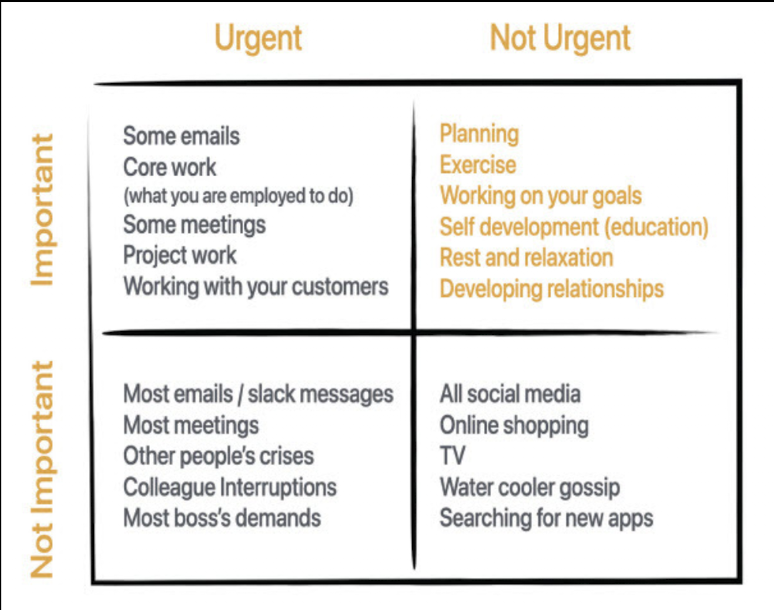
Prioritisation starts at the bottom
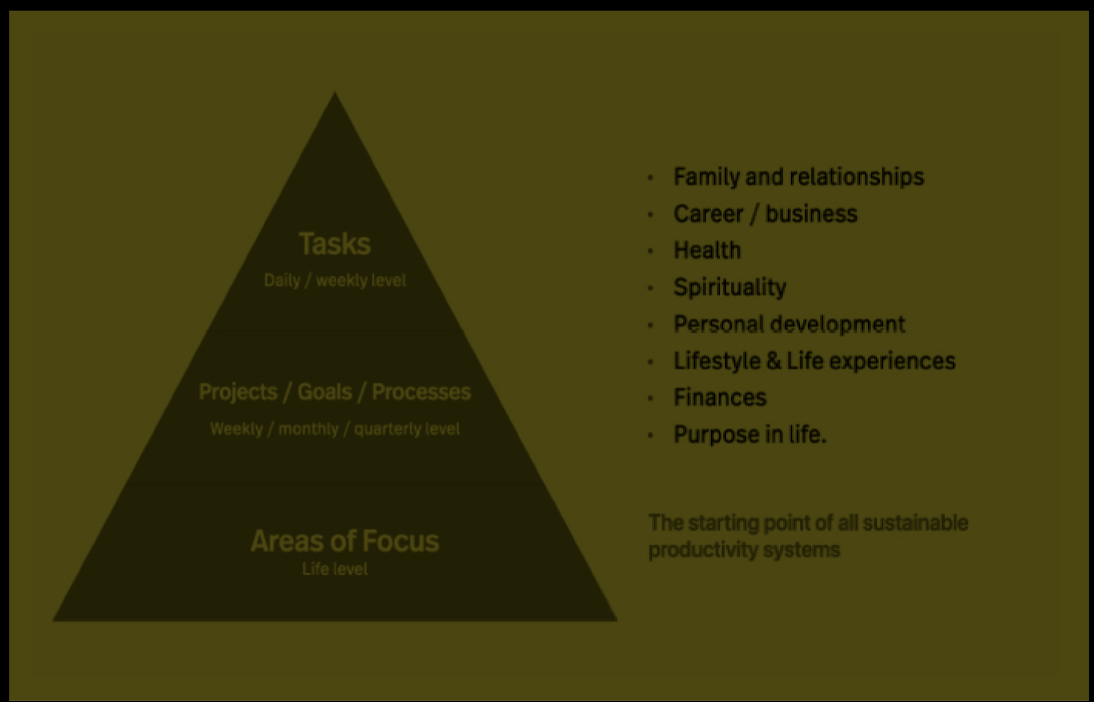
The Weekly Planning Session
plan gives you a direction. It gives your week a focus, and it also means if something comes up that requires your undivided attention, you are still able to regain your momentum towards accomplishing what you set out to accomplish. [p. 179]
If you discover you have fallen behind and you need to do some work on it to get it back on track, you decide what needs to be done and add that task to your This Week folder. If, on the other hand, you see there is nothing [p. 181]
However, as you are going through the project, if you feel it would be important to have a meeting with the key people at the end of the month, you can add that task to your This Month folder. [p. 181]
When doing a weekly planning session, your focus is on what you want to get accomplished next week. [p. 182]
Here’s a quick tip: for projects that involve a lot of consistent work, add the task as a daily or every-other-day task into your task manager and set it to recur as frequently as necessary. [p. 182]
Here’s a checklist you may want to use:
Clear task manager’s inbox.
Review calendar for appointments and commitments for next week.
Review master projects list.
Review This Week folder for tasks not completed (why were they not completed?).
Review Next Week folder and move tasks for next week into This Week’s folder and date the tasks.
Review This Month folder and move any relevant tasks to This Week. [p. 182]
However, once a month, there will be some additional areas to review: Review goals. Review all projects. Review calendar for the month. On [p. 183]
Key questions to ask yourself
Answering a few simple questions helps to keep you focused on what’s important: What do I want to accomplish this week? What must be done? What do I want to make significant progress on? These three questions are powerful. [p. 184]
The weekly planning Matrix
Core Work—Your core work tasks sit in the top left box and don’t change on a week-to-week basis. Projects / Issues—What professional projects or issues need your attention next week? You are only looking at the next seven days, so you only include the ones that require your attention next week. Personal—This quadrant is about your personal areas of focus and any personal tasks/ projects you need to take care of next week. This could be arranging your next holiday, meeting with friends, or something as simple as washing your car or cleaning up your garden. Again, this is only looking ahead seven days; it gives you a chance to address any areas of focus you may have neglected, or perhaps get some outstanding errands done. [p. 188]
Your Radar—The final quadrant is your radar. This is for anything you need to keep an eye on or review, as it may be something coming up in the near future. For instance, there may be a project your colleagues are working on that you have oversight on. You may not have anything particular to do on the project, but as you wait for your colleagues to do their bit, you want to keep an eye on it. [p. 188]
Three of the four quadrants will change each week; only your core work will be fixed. Having your core work tasks written out and in the top left of the quadrant means that the first thing you need to do each planning session is to ensure you have sufficient time on your calendar to complete your core work. Your core work is non-negotiable. It must be done. (Quick tip: to ensure you [p. 188]
An important warning
Think about all the things you want to do and ask yourself what’s stopping you from doing them. If you intend to start your own business, begin a podcast, create online courses, or write a book, find the one step you could take that would contribute directly to having something tangible to show for your idea and do that. The data you get from doing something real will inform you of the next step. [p. 193]
Processing your day
However, when you are working on your projects, be aware of any tasks that need to be done at specific times. For instance, as you are working on a project, you may notice that two or three tasks need to be done this week. Move these tasks to your task manager.
Carl Pullein. Your Time, Your Way by Carl Pullein (p. 198). Kindle Edition.
For conditional tasks -tasks that cannot be done until something else has been completed first — leave these in your project note. There are probably too many unknowns at this stage, and you may find the task no longer needs to be completed.
Carl Pullein. Your Time, Your Way by Carl Pullein (p. 198). Kindle Edition.
What About Email
If there are far too many of these emails that require action, and you are sending them to your task manager, they quickly fill up your inbox to a point where it becomes overwhelming. Add to this that every time you go to respond to the email, you are switching between apps (your task manager to your email app and back again). This becomes a very inefficient way to manage these emails. Instead, create a folder in your email to manage these emails. Then, at a given time each day, you work on clearing this folder.
Carl Pullein. Your Time, Your Way by Carl Pullein (pp. 199-200). Kindle Edition.
Random Tasks
These are tasks that are not connected to a project or a goal that just need doing. You could receive a message to drop by your HR office to pick up some papers, or you’re asked to call someone about a request you made. For these, drop them in your inbox if you cannot do them right now. If you do have time to do them at the time you receive them, then just do them.
Carl Pullein. Your Time, Your Way by Carl Pullein (p. 200). Kindle Edition.
Continually Fiddling and Tweaking
What you may find works is to set up a routine task in your routines folder, reminding you to review your system every three months. This way, you have a way to adjust things, and you can keep a note where you can add thoughts and ideas that could be useful when you come to review your system.
Carl Pullein. Your Time, Your Way by Carl Pullein (p. 209). Kindle Edition.
INbox Zero 2.0
The idea behind InBox Zero 2.0, like the original InBox Zero, is your email inbox is sacred territory. No email should ever remain in there once you have looked at it. You only look at an email in your inbox once and immediately decide what it is, what you need to do with it and where it goes. With Inbox Zero 2.0, there are only three places an email can go. Trash, archive, or the Action This Today folder. Two Simple Questions Ask yourself: What is it? And what do I need to do with it?
Carl Pullein. Your Time, Your Way by Carl Pullein (p. 231). Kindle Edition.
The Soft Email Bankruptcy The less scary way is to create a new folder called “Old Inbox” and then select all emails older than two weeks and move these to your “old Inbox” folder. These emails will stay in that folder until you do something with them. Interestingly, most people delete this folder after four or five months because they realize there is nothing important in there after all. Here is a quick reference guide for managing your emails:
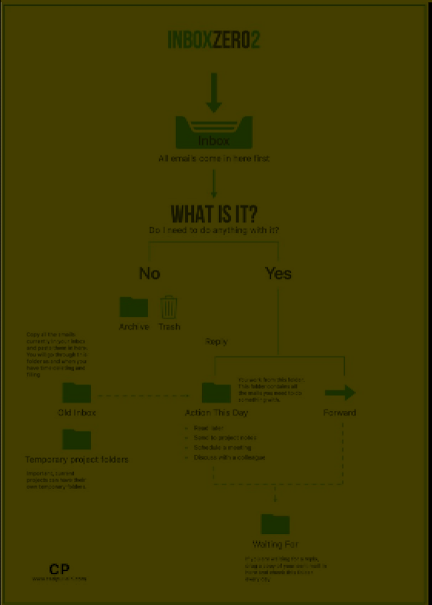
Carl Pullein. Your Time, Your Way by Carl Pullein (pp. 236-237). Kindle Edition.
Warning time! You want to be processing and not doing in the morning. The purpose is to remove the distraction by clearing your inbox and processing it. Processing means deleting, archiving, and moving actionable emails to your Action This Day folder. You must never allow morning email processing to destroy your plan for the day.
Carl Pullein. Your Time, Your Way by Carl Pullein (p. 243). Kindle Edition.