Overview
This guide is to describe how to deploy a single-spa application where one app is a host and the other one is a Microfrontend.
What is Single Spa
Single Spa is a library that allows you to create a Microfrontend app. The concept of it is fairly simple. You have one host app (it can be an app with a UI framework or without) and you have Microfrontends that are used within the host app.
Benefits of using Single Spa
- Allow you to deploy microfrontends independently
- Mount and unmount apps by using routes
- Allow you to build different parts of the UI with different framework, which helps with not having to re-write whole existing app
Vite-Plugin-Single-Spa
Vite Plugin Single Spa is a plugin that sits on top of Single Spa, but abstracts away quite a lot of manual setup that you would have to do, and is opinionated. This plugin does two jobs. Make a vite project a single-spa root project and make a vite project a microfrontend project.
Benefits of using Vite Plugin Single Spa
This plugin helps with the following:
- It integrates with Vite based projects very well
- Adds import maps in the project’s index page, if they have been defined by a developer
- Adds
import-map-overridesin the project’s index page
Root Project
for single-spa root projects, plugin
- ensures import maps are present in the index page of a project if provided by a developer
- adds
import-map-overridespackage in the index page of a project
How to setup a root project
To setup a root project, you have to configure vite-plugin-single-spa in your vite.config.ts file and it should look as follows
vite.plugin.ts
vitePluginSingleSpa({
      type: 'root',
      imo: '3.1.1',
      importMaps: {
        dev: ['src/importMap.dev.json'],
        build: ['src/importMap.build.json'],
      },
    }),
  ],```
- **type** must be set to `root`.
- **imo** specifies the version number of `import-map-overrides` and it should be set to the latest version that the library supports (go to the documentation to check which version you should use)
- **importMaps** allows you to define different importMap files. when you run `vite dev` script, it will use `importMap.dev.json` but during build process, it will use `importMap.build.json`. the default is always `importMap.json` if those do not exist.

Also, you have to configure `single-spa` to register your [[Microfrontend|Microfrontend]] application.

```typescript
registerApplication({
  name: 'vue',
  app: () => import(/* @vite-ignore */ vueApp),
  activeWhen: ['/vuetodos'],
}); - name is a name of your application that the single spa will use to reference the Microfrontend app.
- app is a function that returns a resolved application.
- activeWhen tells single-spa on which path it should activate a particular Microfrontend.
If you want to understand more about how it works, visit single-spa’s docs.
Micro-frontend Project
for single-spa Microfrontend project, this plugin
- sets the server’s port number
- sets asset and entry file names to be generated without a hash
- sets rollup’s input to be the file defining the single-spa lifecycle functions on build or
index.htmlon serve - sets the JS version to
es2022 - requests manifest file creation
vitePluginSingleSpa({
      type: 'mife',
      serverPort: 4101,
      spaEntryPoint: 'src/main.ts',
      cssStrategy: "",
      projectId: "",
}), - type must be
mifeas you want to tell single-spa that this app is a micrtofrontend - serverPort is required as it is the port number that Vite will use when serving dev and preview versions. It should never be a random server port so make sure that server does not start if the port is not what you expect!
- spaEntryPoints tells the plugin where the entry point with all life-cycle functions exists.
- cssStrategy and projectId are properties that are required for CSS to be mounted and unmounted properly when the app mounts and unmounts from the dom. There will be (potentially more than one Microfrontend apps in your app with different CSS files that you, probably, would not want to override, and these two properties help with that. projectId is used to name the CSS files during the build process and when serving, it works as an identifier when it should mount and unmount. By default, it will use your project’s name from
package.json. When it comes to cssStrategy, read this to understand what that is and which one you should be using.
Besides that, there’s one more thing that you have to specify, and that is base of your Microfrontend app and this issue should explain as to why. but TL;DR, the base company should point to your localhost on dev and on build, it should point to a URL of your deployed app.
Your whole Vite config should look more or less like this like this
vite.config.ts
export default defineConfig(({ command }) => {
  return {
    resolve: {
      alias: {
        '@': fileURLToPath(new URL('./src', import.meta.url)),
      },
    },
    plugins: [
      vue(),
      vitePluginSingleSpa({
        type: 'mife',
        serverPort: 4101,
        spaEntryPoints: 'src/main.ts',
        cssStrategy: 'singleMife',
        projectId: 'vue',
      }),
    ],
    base:
      command === 'build'
        ? 'http://poc-microfrontend-vue-dev.s3-website.eu-west-2.amazonaws.com'
        : 'http://localhost:4101',
  };
});
Deployment
To be able to deploy both apps, you can follow the standard setup for a SPA (AWS Infrastructure for SPA). There’s one catch. Because both apps need to “talk to each other”, you have to add CORS configuration for a host and a Microfrontend app.
[
    {
        "AllowedHeaders": [
            "*"
        ],
        "AllowedMethods": [
            "GET",
        ],
        "AllowedOrigins": [
            "http://poc-microfrontend-vue-dev.s3-website.eu-west-2.amazonaws.com"
        ],
        "ExposeHeaders": []
    }
]
CORS
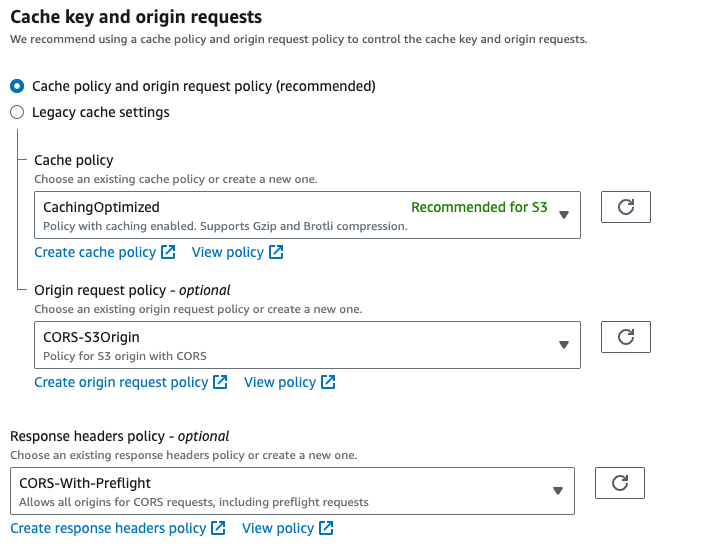
Obviously, to allow the app access files sfrom the other (js, css etc.), you have to setup CloudFront to allows CORS headers to be passed through to your S3 bucket