to initialise a database with prisma, you have to use npx prisma init --url <url>
To push a schema to a database, you have to run npx prisma db push
Models
One-to-one
NC: One-to-one relationship
It is used when only one value can be related with one entity in a database. For example, Social Security Number can only belong to one person.
Referential actions
NC: Referencial actions, Referencial Actions in Prisma
Referential action tells prisma/DB what should happen to a record when a related record is being deleted. It can look like so
model Post {
  id       Int    @id @default(autoincrement())
  title    String
  author   User   @relation(fields: [authorId], references: [id], onDelete: Cascade)
  authorId Int @unique
}

model User {
  id    Int    @id @default(autoincrement())
  posts Post[]
}
One-to-many
NC: One-to-many relationship, Prisma - One-to-many relationship
This relation is usually used when you have two models, where one model can only be related to one record, but the other can be to more than one. For example, a person can have multiple phone numbers, but phone number can only be allocated to one person.
model Person {
  id           String        @unique @default(cuid())
  name         String
  phoneNumbers PhoneNumber[]
}

model PhoneNumber {
  id       String @unique @default(cuid())
  number   String
  person   Person @relation(fields: [personId], references: [id], onDelete: Cascade, onUpdate: Cascade)
  personId String
}
Many-to-many
NC: Many-to-many relationship, Many-to-many relationship in Prisma
This relation is used when an entity in a database can have more than one entity related to that, and an entity in another table, can have more than one entity related to that. A perfect example can be a category in an eCommerce shop and a product
model Category {
  id    String @id @default(cuid())
  title String
  products  Product[]
}

model Produt {
  id    String @id @default(cuid())
  name  String
  categories Category[]
}
To create a many-to-many table in a database, you cannot make relations (it is a limitation of a relational database). Instead, you have to create a third table that stores the relationship.
Consideration when modelling your db
NC: Database models should be created for a particular use case
When creating a database, it is worth thinking how we going to create models. For example, you could create an Image model that stores all images in your application and can be related to multiple different entities. However, that approach is not very optimal, because you have to have many-to-many relationship, and someone may access files that they should have. It is much better approach to create a table for a particular use case. For example, UserImage table with user images. NoteImage with note images etc. Schemas may be duplicated, but they have only single use case, and have more specific relationship.
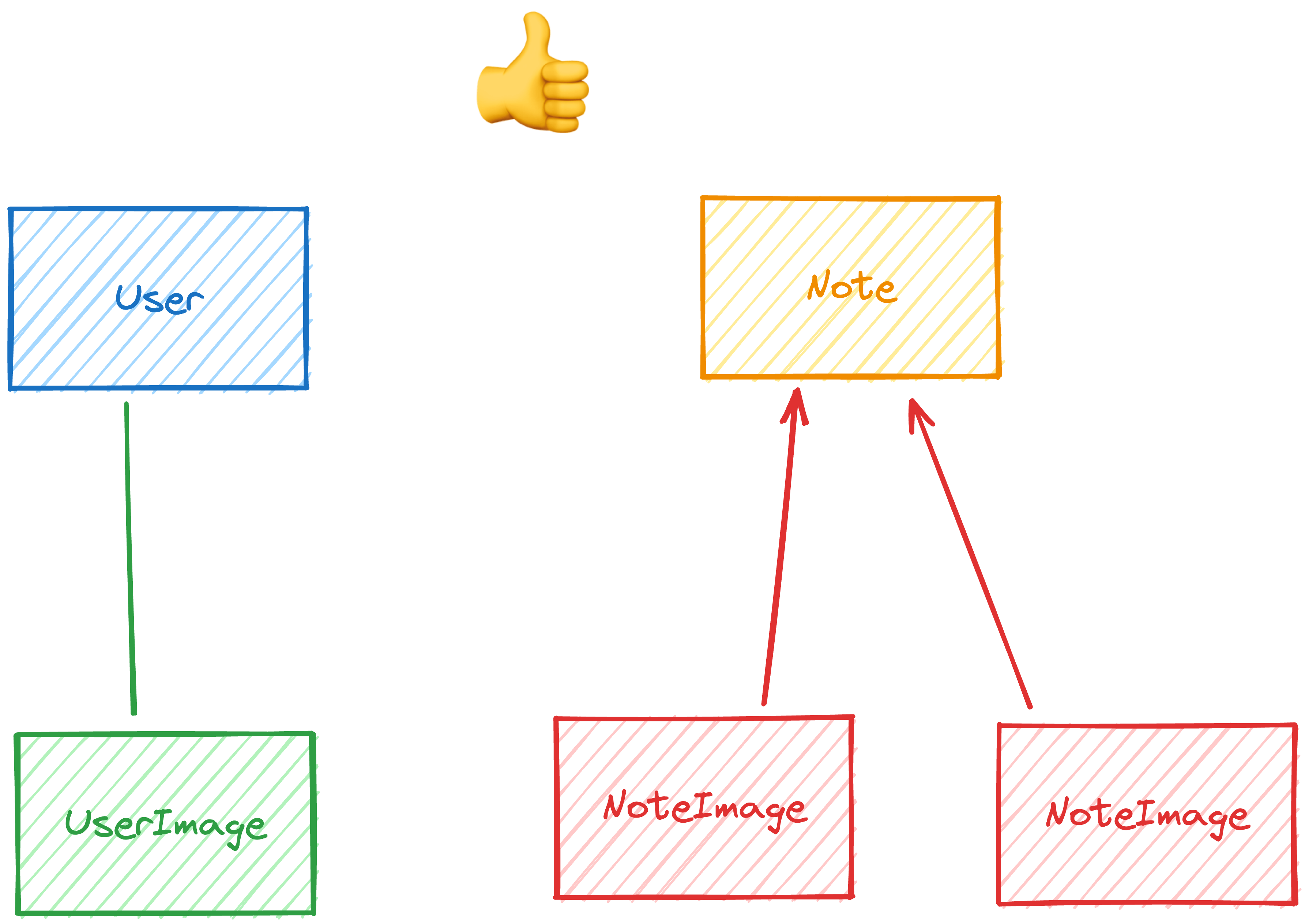
User→UserImage: one-to-oneNote→NoteImage: one-to-many
What is blob
NC: Blob
Blob is a Binary Large Object that has data of an arbitrary size. It is just a series of bytes
Data Migrations
NC: Data migrations
Data migrations are used when you have to make a change to a database schema, and it is a breaking change.
To do that in prisma, you can use npx prisma migrate deploy. It creates migration files
Widen and Narrow
- Widen app to consume A or B
- Widen db to provide A and B and the app to write to both A and B
- Narrow app to consume B and only write to B
- Narrow db to provide B
When to use push and deploy
NC: push script, migrate and deploy
Use push when working locally and deploy when you know it’s working and it’s ready to be deployed to production, probably during a deployment process in a CI/CD
When the change is considered breaking schema change
NC: When the database schema change is considered a breaking change
When we add a new model and a new relation, we, technically, do not need to run migration, because there’s nothing that can break. However, if the change changes the value of a data that an entity in a table accepts, or it is made optional while currently it is required, that is considered as a breaking change. All these changes should be committed to a git repo and deployed to your app. Also, all applied migrations are stored in your database.
Data Seeding
NC: Database Seeding, Database Seeding in Prisma
Data seeding is updating a database with some data in tables so that we can work on something in dev. it can also be used in prod if we need to seed the database with User Roles etc.
in Prisma, you can run npx prisma migrate reset which will run seeding after db has been cleared, or npx prisma db seed.
Nested Queries
NC: Nested Queries in Prisma
Those queries in prisma generate a more optimal SQL for you and it also connects foreign keys for you. Without it, you have to do all of it manually
example of nested query
await prisma.note.create({
	data: {
		id: 'd27a197e',
		title: 'Basic Koala Facts',
		content:
			'Koalas are found in the eucalyptus forests of eastern Australia. They have grey fur with a cream-coloured chest, and strong, clawed feet, perfect for living in the branches of trees!',
		ownerId: kody.id,
		images: {
			create: [
				{
					altText: 'an adorable koala cartoon illustration',
					contentType: 'image/png',
					blob: await fs.promises.readFile(
						'./tests/fixtures/images/kody-notes/cute-koala.png',
					),
				},
				{
					altText: 'a cartoon illustration of a koala in a tree eating',
					contentType: 'image/png',
					blob: await fs.promises.readFile(
						'./tests/fixtures/images/kody-notes/koala-eating.png',
					),
				},
			],
		},
	},
})
Generating Seed Data
NC: Generating Seed Data
Generating data for seeding database is very useful, as you can get different data every time you run the seeding script.
To make sure all of it is reusable, you can create a function
import { faker } from '@faker-js/faker'

function createRandomUser() {
	return {
		_id: faker.datatype.uuid(),
		avatar: faker.image.avatar(),
		birthday: faker.date.birthdate(),
		email: faker.internet.email(),
		firstName: faker.person.firstName(),
		lastName: faker.person.lastName(),
		sex: faker.person.sexType(),
		subscriptionTier: faker.helpers.arrayElement(['free', 'basic', 'business']),
	}
}

const user = createRandomUser()
You can also create dynamic data with a fix range of elements.
NC: Code Snippet - Generating random data - Faker
import { faker } from '@faker-js/faker'

const numberOfThings = faker.number.int({ min: 1, max: 10 })

// then you can use that number to generate an array of things:
const things = Array.from({ length: numberOfThings }, () => {
	// create your thing...
})
To make sure your data is unique, you can use enfore-unique
NC: Unique entities in DB are generated as unique
const uniqueEmailEnforcer = new UniqueEnforcer()

const email = uniqueEmailEnforcer.enforce(() => faker.internet.email())
The last but not least, you want to make sure that the data you generate matches your schema requirements. If your field has a limit of characters it can receive, then you definitely want to generate a text with the max char length
const reviewTitle = faker.lorem.words(10).slice(0, 50) Querying
Init setup of Prisma
NC: Code Snippet - Singleton in TS Create single instance of Prisma Instance
When setting up prisma client, you have to make sure that there’s only one instance of prisma client (singleton). You want to avoid having multiple connections to your database open at the same time. To get this working, you can create a reusable function like so
function singleton<T>(name: string, value(()=>T) {
	const yolo = global
	const yolo.__singleton ??= {}
	const yolo.__singleton[name] ??= value()
	return yolo__singleton[name]
}
Select
NC: Always select what should be returned from a Database table
When querying data from a database, we don’t want to return all fields from a table and there are a few reasons
- Waste of resources
- sensitive data such as passwords etc.
Multiple Select queries
Prisma allows you to
NC: Code Snippet - Multiple Select Queries in Prisma
const data = await prisma.user.findFirst({
	where: {
		username: params.username,
	},
	select: {
		id: true,
		name: true,
		username: true,
		image: true,
		notes: {
			select: { id: true, title: true },
		},
	},
})
Updating Data
To update the data you can do 3 things:
Insert
NC: INSERT statement
You can insert data into a table by writing a query.
INSERT INTO table_name (column1, column2, column3)
VALUES (value1, value2, value3)
In Prisma, you can do it like so
NC: Code Snippet - Insert into table in Prisma
await prisma.user.create({
	data: {name: "Oskar"}
})
Update
NC: UPDATE statement
This is a query that updates the record in a database
UPDATE table_name
SET column1 = value1, column2 = value2
WHERE condition;
In Prisma
NC: Code Snippet - Update Record in Prisma
await prisma.user.update({
	data: {name: "Oskar"},
	where: {id: 1}
})
Upsert
NC: UPSERT statement
It is basically a query that updates or creates a record in a database if it doesn’t exist
INSERT INTO table_name (column1, column2, column3, ...)
VALUES (value1, value2, value3, ...)
ON CONFLICT (column1)
DO UPDATE SET column2 = value2, column3 = value3, ...;
In Prisma
NC: Code Snippet - Upsert in Prisma
await prisma.rocket.upsert({
	where: { id: 1 },
	update: { name: 'Falcon 9' },
	create: { name: 'Falcon 9' },
})
Delete
NC: DELETE statement
This is a query that basically deletes a record from a table
DELETE FROM table_name
WHERE condition;
In Prisma
NC: Code Snippet - Delete record in Prisma
await prisma.rocket.delete({
	where: { id: 1 },
})```

Prisma doesn't support `createMany` but you can use `deleteMany` and `updateMany`. It will work when `where` clause matches more than one record and that update will apply to every record.

### Transactions
NC: [[Transactions|Transactions]]
Transaction is a way of updating data in a SQL database that make multiple updates/queries at the same time and if one of them fail, the one that have already been done will rollback the changes.

```sql
BEGIN TRANSACTION;
UPDATE table_name
SET column1 = value1, column2 = value2
WHERE condition;
UPDATE table_name
SET column1 = value1, calumn2 = value2
WHERE condition;
COMMIT;
In Prisma:
NC: Code Snippet - Transactions in Prisma
await prisma.$transaction([
	prisma.rocket.update({
		where: { id: 1 },
		data: { name: 'Falcon 9' },
	}),
	prisma.rocket.update({
		where: { id: 2 },
		data: { name: 'Falcon Heavy' },
	}),
])

// OR

await prisma.$transaction(async $prisma => {
	await $prisma.rocket.update({
		where: { id: 1 },
		data: { name: 'Falcon 9' },
	})
	await $prisma.rocket.update({
		where: { id: 2 },
		data: { name: 'Falcon Heavy' },
	})
})
!Check Buffer in Node.js
Caching in Remix
Remix uses Cache-Control header to check cached data. To avoid this, you have to make sure that the ID is new
SQL
NC: Writing Raw SQL in Prisma
In some cases, we need to use raw SQL and a great example is usually search. Prisma allows us to write raw sql by using prisma.$queryRaw. It supports parameterised queries so you don’t have to worry about SQL injection.
const ships = await prisma.$queryRaw`
SELECT name, username from user WHERE user.id = ${params.userid};
But it returns unknown. You will have to use zod to parse and check whether it returns what you expect or not.
LIKE
NC: LIKE operator
SQL allows you to use wildcards % and LIKE allows you to search for a specific pattern in a column
SELECT username from user WHERE name LIKE "%oskar%"
OR
NC: OR operator
If you want to create a query to filter records based on more than one condition and return if one of the conditions have been met
LIMIT
NC: LIMIT clause
LIMIT is used to specify the number of records that should be returned
JOIN
NC: INNER JOIN, LEFT JOIN, RIGHT JOIN, FULL JOIN
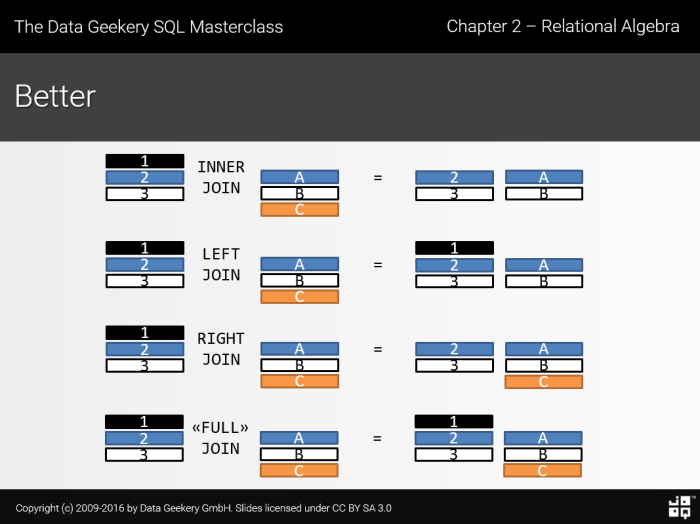
Left Join
Left Join will return a table with everything on the left hand side, whether condition is met or not and only what matches the condition from the right side.
SELECT ships.id, ships.name, models.name as modelName
FROM ships
LEFT JOIN models ON ships.modelId = models.id
ORDER BY
NC: ORDER BY
ORDER BY allows us to order the query based on condition and it looks like so
SELECT User.id, User.username
FROM User
WHERE User.id = params.id
ORDER BY
(SELECT Note.updatedAt
 FROM Note
 WHERE Note.ownerId = User.id
) DESC
Query Optimisation
NC: Performance Optimisation
Quite often, people bump the scaling of a hardware when performance suffers, but they do not fix the issue which is the performance of the query.
Indexing
NC: Database Indexing, Single-column index
Indexing is a method of “symlinking” your data to some index. For example, you can create an index for createdDate and if someone wants to quickly find a photo by date, then you can quickly find it if createdDate is indexed.
You can create more than one index so if someone wants to find a photo by location, you can do it as well.
NC: Multi-column index
You can also create combined index (multi-column index)
Things to consider
NC: Considerations
- Indexes take more space in a database
- It takes more time to add new records
NC: Optimise for read than for write
However, it is always better to optimise for read than for write, and users will be fine with waiting a bit longer when saving data. Also, most apps are read-heavy.
In Webapps, you should, by default, add indexes that speed up queries and only remove them, if they cause performance issues
Index by default
- Primary Keys - Prisma does it for you on each table. Highly likely you are going to lookup record by its ID
- Foreign Keys - Indexing foreign keys help with speeding up read queries, because it will help to find the record with a foreign key much faster. The rule of thumb should be indexing foreign keys for fields which are not unique.
IMPORTANT
Some databases (MySQL) index foreign keys by default. Prisma sticks to the normal behaviour of a database. However, all records with @unique in a model definition will be indexed by default by Prisma. - Anything in
WHEREandORDER BYclauses - if you are filtering or sorting by a column, this can speed up the query by quite a bit. In some cases, you can add multi-column indexes (find by and then sort by something)
Index opportunities
- If your database is doing a full scan and memory, and CPU spikes, it is a good sign that you need to add index in one of the queries.
To figure out what the database will do while running the query, you can useEXPLAIN QUERY PLAN
Example
  EXPLAIN QUERY PLAN SELECT * FROM user WHERE name = 'Alice';

  OUTPUT

  QUERY PLAN
`--SCAN user
If query is indexed, it will look like this
QUERY PLAN
`--SEARCH user USING INDEX User_username_key (username=?)